Deterministic Linux VMs
Scrub any run back to the step that broke it.
Rewind VM runs a Nix build, a test suite or any Linux command inside a deterministic KVM virtual machine. The same inputs produce the same events at the same steps, every time. When it fails, drag the timeline back to where it went wrong, look around, and fork from there.
The engine and CLI are open source under the MIT license. The desktop app is $49 for personal use and free to evaluate.
Build log · up to this step
Process tree · alive
Files · newest first
At this step
How it works
Nothing is recorded while the workload runs. A run is a function of its inputs, so any step of it can be computed again.
-
Pack the inputs
The inputs, a Nix closure or any root filesystem, become a read-only erofs image mapped straight into the VM's memory. A small Linux kernel boots and runs your command.
-
Run deterministically
One vCPU on stock KVM, so code in the VM runs on the real CPU. The VM's kernel carries a small Rewind platform: interrupts arrive only when the VM hands control to Rewind, time moves only then, and the timestamp counter and hardware RNG are hidden. A step is one of those handoffs.
-
Keep keyframes
Every quarter second of wall time, Rewind snapshots the machine using KVM's dirty-page log. Pages go into a content-addressed store (BLAKE3, zstd), so a page shared by keyframes, runs and forks is stored once.
-
Seek
To reach a step, Rewind restores the latest keyframe at or before it and runs forward. Same inputs, same events at the same steps.
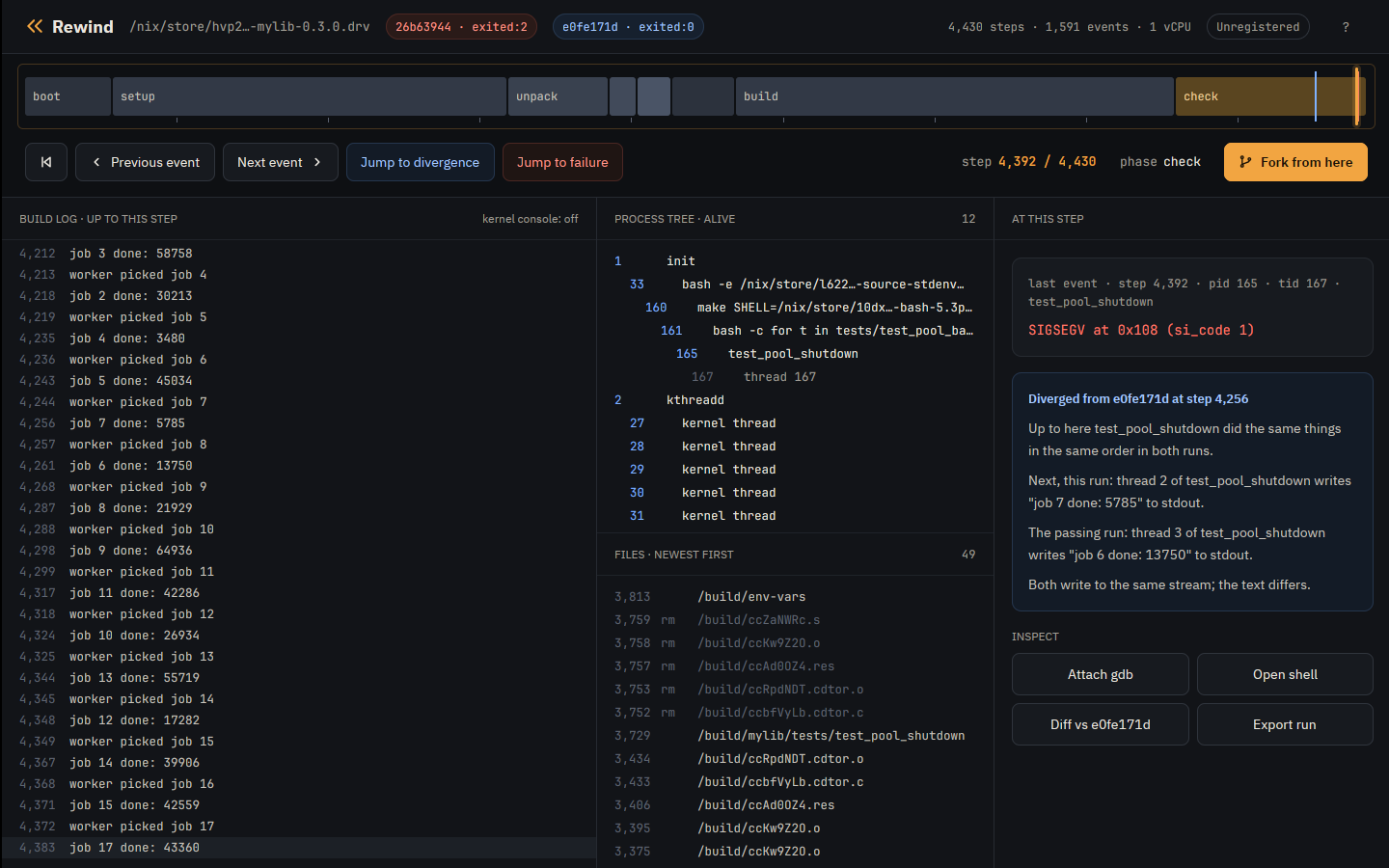
In the desktop app
-
The timeline
The run's phases, the playhead, where the failing run left the passing one, and the failure. Drag to any step, or jump to the divergence or the failure.
-
Build log
Everything the build printed, up to the step under the playhead.
-
Processes and files
The processes and threads alive at that step, and the files written so far.
-
At this step
The event at the step, here a SIGSEGV at 0x108, and where this run parted from a passing run of the same build.
-
Fork from here
Branch at the playhead under a new schedule, reschedule requests plus up to 50 µs of timer slack, so the threads interleave differently from there on.
Planned gdb at a step and a shell at a step.
Bring a command, or bring a derivation
Any Linux workload
A root filesystem and a command
$ rewind run --root mylib.tar --cwd /src -- make check
The root is a directory, an erofs image, or a tarball such as
docker export writes. The VM mounts it under a writable overlay, and
nothing the command writes reaches your disk.
- flaky tests
-
rewind checkreruns the command under perturbed schedules until one ends differently, then narrows the perturbation to the steps that matter. - CI failures
- A failing run is a directory holding its inputs and every event with its step. Keep it and scrub back from the crash instead of reading a log that ends there.
- heisenbugs
- A race that vanishes when you add a printf stays put. A failing run fails the same way every time it runs.
- exploration
- Fork a passing run at a step under new schedules to try other interleavings from that point on.
For Nix users
Nix builds are already almost a closed world
$ rewind nix .#mylib
$ rewind check .#mylib
Pinned inputs, no network, fixed paths. Point Rewind at a flake attribute and most of the work of making the build deterministic is already done.
- .drv
- The derivation hash is the unit of reproduction.
- the machine
- The VM's kernel is a derivation too, so the whole machine is pinned.
- rewind check
-
nix build --checksays the output "may not be deterministic".rewind checkbuilds under perturbed schedules, stops at the first build that ends differently, and shows where the two runs part. - the output
-
GNU hello built in the VM runs at native speed and is bit for bit the host's
build.
rewind nixcompares output hashes with the host's copy. - the clock
- The VM's wall clock starts at midnight UTC of the day the run was made, and a replay uses it again.
Tutorials
Both follow one real bug, a shutdown race in a small C thread pool, from install to fix. Every transcript in them is real output.
A flaky Nix build
Install with Nix, let rewind check find the interleaving that crashes a
derivation's tests, then replay it, fork it and check the fix.
A flaky test in a container
The same bug from a Docker image with no Nix: export the filesystem, find the failing schedule and replay the crash exactly.
Read the tutorial →Download
For x86_64 Linux with KVM. The engine and CLI are open source on GitHub, and the desktop app is free to download and use while you evaluate it.
With Nix
Run either straight from the flake, or install both into your profile:
$ nix run github:fzakaria/rewindvm -- pmu status
$ nix run github:fzakaria/rewindvm#app
$ nix profile install github:fzakaria/rewindvm github:fzakaria/rewindvm#app
The builds come from rewindvm.cachix.org, so nothing compiles on your
machine. Nix asks once whether to trust that cache; say yes, or pass
--accept-flake-config.
On NixOS, add the flake as an input and turn on its module:
inputs.rewind.url = "github:fzakaria/rewindvm";

# in your configuration, with inputs.rewind.nixosModules.default imported
programs.rewind.enable = true;
programs.rewind.app.enable = true;
# AMD only: make the branch counter exact at every boot
programs.rewind.amdBranchCounterWorkaround = true;
Without Nix
Two tarballs from the latest
release. The CLI's holds the
rewind command, the VM's kernel and everything it needs to build input
images, so the host needs nothing else. The app is built against glibc 2.31, runs with
your own graphics drivers and has been tried on Ubuntu 24.04 and Fedora 41. Unpacked side
by side, the app uses that rewind for forks and for reading files at a step.
$ curl -L https://github.com/fzakaria/rewindvm/releases/latest/download/rewind-x86_64-linux.tar.gz | tar xz
$ curl -L https://github.com/fzakaria/rewindvm/releases/latest/download/rewind-app-x86_64-linux.tar.gz | tar xz
$ ./rewind-x86_64-linux/bin/rewind pmu status
$ ./rewind-app-x86_64-linux/bin/rewind-app
If /dev/kvm is not readable and writable by you, add yourself to the
kvm group. The app download is the whole app, with nothing locked. Until you
enter a license key it says it is unregistered and reminds you now and then; see
pricing.
Pricing
Sold the way Sublime Text is. Evaluate the app free for as long as you like, with an occasional reminder. Buy a license when it earns its keep.
Engine and CLI
Free MIT license
The engine and the command line. The VM's kernel is Linux with a patch and config of ours, GPL-2.0 as Linux is.
-
rewind run,rewind nixandrewind check - Open source, for any use
Personal
$49 once
The desktop app, for you.
- All your machines
- 3 years of updates
- Offline license key by email
Commercial
$99 per seat
The desktop app, for use at a company.
- One seat per person using the app
- Offline license key by email
Every license comes with a full refund within 30 days, for any reason. See the refund policy.
Checkout for licenses is not open yet. The engine, the CLI and the desktop app are all free to download now, and the app works fully while unregistered. To hear when checkout opens, write to tacos@lunchtimesurf.com.
Limits
- Linux on x86_64 with KVM.
- One virtual CPU. Your threads take turns, and speed comes from running many machines at once.
- A loop that spins without a system call is never interrupted. Locks, sleeps and I/O are fine.
- A run replays on other recent machines with the same CPU vendor, Intel or AMD.
- No network, other than loopback.